
A travel community, not another travel app

Plan it together.
Leave an imprint.

Plan with friends, travel together and share it as it happens. Every new country is a level, every journey a badge, and any post on Explore can become your next trip in two taps.


Tokyo, October

Priya Raman: Booked it — 14A, right by the window

Fwd: Your JAL e-ticket

To trips@imprint-travel.com

1 flight · 1 hotel · 5 placeson one trip, in date order
Numbered in the order you walk themon Apple Maps, with the route
JL67 gate change

Now boarding at gate S9 (was S4).

Where it actually isADS-B position, every 5 seconds
11,277 m · 492 ktsaltitude and speed off the transponder
JL67 arrived

Landed in Tokyo · bags at belt 6.

Level up

You reached Level 15

Japan — country 15the one that raised the level

Voyagerthe rank at 15 countries

Layover legendmake 10 connections

Every phone on this page is a screen recording of the Imprint app, on iPhone or the web at phone size, with invented travellers and sample posts.

3apps on one account: web, iPhone and Android
8languages, in every app
23badges and 7 ranks to earn, one country at a time
$0to start. Friends join your trips free
The loop

Every trip
starts the next one.

Imprint is a travel community, not another travel tool. Someone reads a post, turns it into a trip with friends, travels it together, levels up, and shares it back. Then the next traveller finds it.

  1. DiscoverA guide, a snapshot or an answer from someone who went.
  2. PlanTwo taps save it to a trip, or AI drafts the days. Friends join free.
  3. TravelOne chat, one album, one budget. Bookings and flights look after themselves.
  4. Level upEvery new country is a level. Cities and journeys earn badges.
  5. Share backYour photos, guides and answers become someone’s next trip.
01AI

Start with an idea.
AI does the rest.

Plan in ChatGPT or Claude and send the trip straight to Imprint, or tell Imprint’s own planner where you’re going. Either way the trip arrives on a real map, ready for your friends.

01 / 02 · ChatGPT & Claude Imprint Pro

Plan it in ChatGPT or Claude. It lands in Imprint.

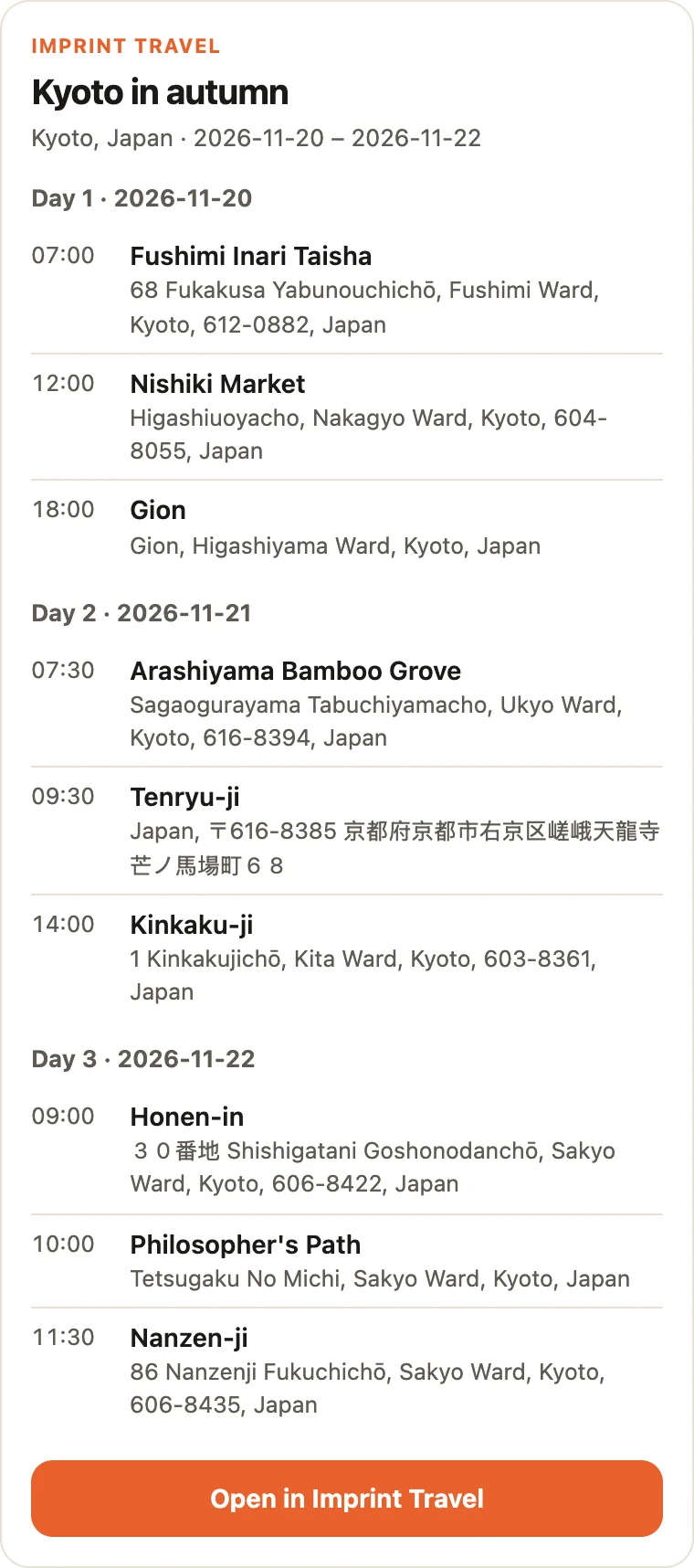
Connect Imprint to the AI you already use. Ask for three days in Kyoto, say “save it to Imprint”, and the trip arrives day by day, every place pinned on the map, ready for your friends.

02 / 02 · Plan with AI Imprint Pro

One sentence in. A whole trip out.

Type or say where, how long and what you love. Imprint drafts the days, puts the places you saved first, and lets you untick anything before it becomes a trip, or a note to come back to.

You, in ChatGPT or Claude

Plan three days in Kyoto: temples early, a market lunch, the bamboo at dawn. Save it to Imprint.

Imprint · create_tripTrip created · 9 places
The trip card your AI shows
Imprint's trip card: Kyoto in autumn, three days, nine places, and Open in Imprint Travel
Say it or type itwhere, how long, what you love
Planning your trip…a day-by-day plan in seconds
Every place tickeduntick what you’d skip
From your Bucket listNezu Shrine, saved from a Find
A trip, ready to shareplaces pinned, friends join free
02Trips

Plan it together.
Share it with anyone.

Everyone on the trip forwards their own bookings to one itinerary on a real map, adds places and notes, and keeps the costs together. Send it to anyone as a link, a PDF or an email. On the day, Imprint Pro follows the flight from the gate to the baggage belt.

01 / 10 · Today

Today, on one card

On the day, Trips opens on today: the flight you’re on, what’s next, and directions or a ride from every stop.

02 / 10 · From your inbox

The trip, already built

Forward a flight or hotel confirmation and it lands on the right trip, in date order, next to the places you add. Trains, cars and dinner reservations show up too, and you choose where they go.

03 / 10 · Map

Every stop on a real map

Flip the itinerary to the map and your day becomes a route: numbered pins, with the stop list right under your thumb.

04 / 10 · Notes & costs

Notes on every stop

Tap a stop and it opens: jot a note, the time, what it cost, any files. It saves as you type, and the trip’s budget adds up what you spend.

05 / 10 · Share link

One link for the family group

Make a read-only link and drop it in WhatsApp. Anyone can open the whole itinerary with no account, never your confirmation numbers, and anyone who likes it can make it their own trip.

06 / 10 · PDF

The trip as a PDF

Export the itinerary as a clean document: a summary of every day first, then each stop with its photo, and the map last. Print it, save it, keep it for the road.

07 / 10 · Email

Email it in one go

Send the PDF to up to five people at once, friends from your list or any address, with a note. Replies come straight to you.

08 / 10 · Live flight Imprint Pro

The plane, where it really is

Tap the flight and follow it on the map: its real position, altitude and speed, every five seconds while you watch, and the time left to landing.

09 / 10 · Offline Imprint Pro

Still flying in airplane mode

Lose the signal and the map keeps going: an estimate flies on along a faded line, and the real track takes over the moment you’re back online.

10 / 10 · Alerts Imprint Pro

The gate moves. Your phone says so.

A gate assigned or changed, a delay of 15 minutes or more, your landing: each one is a notification, and the card updates under it. The landing alert says which belt your bags are on.

In the air · on timethe flight you are on, first
17 min walk · 0.85 mibetween the next two stops
Fwd: Ginza Grand Stay

Confirmation GS-4471902 · to trips@imprint-travel.com

Filed on JapanSep 23 → Sep 28 · 5 nights
Sensō-ji · visitedticked off as you go
5 stops across Tokyonumbered over the whole trip
Every stop has its photoopen the list to see them all
Tap a stop and it opensTokyo Skytree, from the itinerary
A note of your ownsaved as you type
Visited · cost · time · filesone tap each, on the same card
Share linkfrom the trip’s ··· menu
A read-only linkno account needed to open it
Never shownconfirmation numbers, costs, who’s going
Make it my tripa reader copies the places to their own
Export PDFbookings and notes, A4 or Letter
Your PDF is readyin a few seconds
Every day, then every stopwith photos, and the map last
Print it, send itor keep it for the road
Up to five peopleany address, or friends from your list
Priya Ramanpicked from your friends
Sent to 2 peoplethe PDF attached, replies come to you
In the air · landing 15 min earlythe card turns to the arrival
Where it actually isflown track solid, the rest dashed
Shown at 30× speedaltitude and speed as it climbs
Offlineposition and times become estimates
Shown at 150× speedthe estimate keeps flying the route
Back onlinethe real track replaces the guess
Gate assigned: E25a notification, and a new tile
Gate change: E27was E25 · the card says Boarding
Landed · bags at belt 7the belt is in the alert
03Chats

Plan it in the group chat.
Find each other IRL.

Add friends by name or by their code, message one friend or a whole group, and every shared trip gets a chat of its own, for photos, places, a folder everyone can add to, and where you are, live. Tap a friend to see their Passport, or put yours side by side.

01 / 09 · Add friends

Add a friend, two ways

Search for someone by name, or scan their code across the table. Your request comes with a note, so they know it’s you.

02 / 09 · Profiles

A friend’s whole Passport, one tap away

Tap a friend’s name: their level and rank, where they’ve been, their badges and their posts, and a few lines about themselves in their own words.

03 / 09 · Compare

You vs. a friend

Compare Passports puts you side by side: countries, continents, cities, flights, miles and badges, who leads, and one map of where you’ve both been.

04 / 09 · Messages

Message a friend

Once they say yes, they’re in Friends. Tap one and say something: you’ll see them typing, and when they’ve read it.

05 / 09 · Groups

Groups, and a chat for every trip

Name a group and tick who’s in. Every shared trip has its own chat too, with everyone on the trip, friends or not.

06 / 09 · Photos

Send a photo

One + in every chat: a photo from your library, the camera, a place, your location or the trip’s album.

07 / 09 · Places

Send a place, not a screenshot

Pick a stop from the trip and it lands in the chat on a real map, with Add to trip and Directions. Replies show up while the chat is open.

08 / 09 · Folders

A folder everyone can add to

Make a folder for the trip right from the chat. Everyone on the trip can add photos and videos to it, and download them full size.

09 / 09 · Location

Share where you are, live

Send where you are once, or share it live: everyone sharing shows up on one map, moving, while the chat is open. Tap Stop and your dot disappears.

Find peopleby name, or an exact email address
A note with the request“From the food tour”
Or scan their codeLucas Ferreira, across the table
Request sentwaiting for them to answer
Lv 15 · VoyagerPriya’s level, from 15 countries
Jetlag immuneevery badge opens full size
Finds · Snapshots · Circleeverything they’ve posted
0 : 4 · Priya leadswho’s ahead, row by row
13 vs 15 countries68,183 vs 72,447 miles
Both · only you · only Priyaevery country, on one map
All friendsKenji, Lucas and Mei, just added
Lucas Ferreirafriends since Oct 2026 · his posts
Typing…then his reply, while you watch
Read“Kuromon Market. Go hungry!”
New group chatname it, tick who’s in
“I’m in!” · “Same here!”Mei and Lucas, replying live
Osaka Weekendthe trip’s own chat
Photo · Camera · Place · Locationone + for all of it
SentDotonbori, from your photos
Places on this trippick one to send
Kuromon MarketAdd to trip · Directions
Sam’s reply, live“Saturday breakfast, yes!”
Trip album, from the chatfolders the whole trip can open
New folderReceipts & tickets
2 itemsphotos and videos, up to 50 MB each
Once, or liveSend current location · Share live location
Where you are, on a mapAdd to trip · Directions
You · Priya Ramanboth on one map, both moving
Stop location sharingone tap, and your dot is gone
04Explore

Your next trip starts
with someone else’s.

Finds from people who’ve been, snapshots of a single place and answers in Circle, ranked for you and readable by anyone with the link. Every place has its own page, and every post is two taps from your own trip.

01 / 05 · Finds

For your next trip, first

Explore opens on what other travellers posted about where you’re going next, then a feed of Finds ranked for you: itineraries, reviews and slow weekends from people who went.

02 / 05 · Save to a trip

Want to go? Two taps.

Every place in a post has Want to go, which keeps it on your Bucket list, and Add to…, which puts it on a trip. The trip has it before you’ve closed the post.

03 / 05 · Snapshots

One place, real photos

A grid of moments from everywhere. Open one to swipe through the photos, like it, see who wants to go, and tap through to the place.

04 / 05 · Place page

Every place has its own page

Photos from travellers who went, Google’s rating beside Imprint’s own, what people say about it and how many want to go. Leave a review in seconds: a face, some stars, a line.

05 / 05 · Circle

Ask the people who’ve been

Questions and answers by topic, with the best answer right on the card. Vote the useful ones up; the asker marks the one that worked. Been somewhere? Circle asks you to help.

For your trip to Tokyoposts about your next city, first
For you · Followinga feed of Finds ranked for you
Three slow days in TokyoHana Kim’s guide, day by day
On your Bucket listNezu Shrine, kept for later
Add Nezu Shrine to…any of your trips or notes
On Tokyo, Octoberbeside the group’s other places
Snapshotsone place and the photos taken there
Fushimi Inari before sunriseKenji Mori · 4 photos
Likes and commentsand the place, one tap away
Sensō-jitravellers’ photos first, then Google’s
Saved to your Bucket listJapan · Tokyo
4.7 · 100% liked itreviews from people who’ve been
You’ve been to Tokyoa question there needs you
Is the JR Pass still worth it?3 answers · in Japan
Accepted answermarked by the person who asked
05Passport

Every trip
leaves an imprint.

Your Passport fills itself as you go: a globe of everywhere you’ve been, a timeline of every trip, your lifetime stats, badges dated to the day you earned them, and every trip’s photos. Then turn any of it into a picture worth posting.

01 / 08 · Globe

Everywhere you’ve been

A globe of every city you’ve reached, by plane, by train, or by the hotel you slept in, with your footprint map beside it.

02 / 08 · Footprint

Your footprint, ready to post

Open your footprint full screen, pick a look (Light, Dark or Imprint) and save it or send it anywhere.

03 / 08 · Timeline

Every trip, on a timeline

Tap the calendar beside My footprint and the map becomes a timeline of every trip, newest first, each with its cover, its dates, how many days it ran and the flags of where it went.

04 / 08 · Level up

New country, new level

Every first-time country levels you up, and your rank climbs with it. Every badge shows the day you earned it.

05 / 08 · Lifetime

Your lifetime stats

Miles flown, hours in the air, flights, countries, plus a shelf of badges that say what each one took.

06 / 08 · Badges

Your badges, on one poster

Tap Share on your badges for one poster: your rank and your latest badge in every category, each with the day you earned it.

07 / 08 · In motion

All-time in motion

Everything on one poster: the countries you’ve filled in, every route on top, how much of the world you’ve seen, your stats and your flags.

08 / 08 · Memories

Every trip’s photos, in one grid

Memories holds every photo from every trip album, yours and the ones you’re invited to, by trip or by year.

17 cities pinneddrag the globe to spin it
14 countries · 7.2% of the worldand the blank half, honestly
The footprint, full screen14 countries · 17 cities
Three papersLight, Dark or Imprint
Save it or send itto Photos, or to any app
The map, as a timelineone tap on the calendar
Every trip, newest firstits cover, dates, days and flags
Year by yearback through 2025 and 2024
Level up

You reached Level 15

Voyagerthe rank at 15 countries
48,781 mi flowntwice around the world
Frequent Flyerfly 25 times · Nov 9, 2025
Your rank, on topExplorer · 14 countries
Every category’s latestwith what it took, and when
Save it or send itto Photos, or to any app
7.2% of the worldevery route you flew, on one map
16 flights · 48,781 mi4d 6h in the air · 17 cities
Share to Storiesor save it to Photos
Memoriesevery photo from every trip album
By tripfriends’ names on their photos
By year2026 · 16 pictures · 2 trips

Keep exploring.

Start a trip, invite your friends free, and watch your Passport fill up.

Free to use: trips with friends, chat, Explore, your Passport and its badges. Imprint Pro is $4.99 a month or $39.99 a year for planning with AI in Imprint, ChatGPT or Claude, live flight tracking and landing alerts, unlimited imports and trips, and 30 GB for your photos.